Nav Social Menu

    • Amazon
    • Email
    • Facebook
    • Instagram
    • TikTok

My Mini Adventurer

Jello Shots, Recipes and Fun!

  • About
    • About Me
    • Seen and Heard
    • Privacy Policy/Cookies
  • Travel
    • USA
      • Florida
      • Philadelphia
      • New England
      • Other USA Locations
    • Disney
    • Cruise
    • Europe
      • Austria
      • France
      • Germany
      • Italy
      • Spain
      • Switzerland
      • UK
  • Shots
    • Christmas Shots
    • All Jello Shots
    • Summer Themed Shots
    • Wizard Themed Shots
    • Epcot Themed Shots
    • Halloween Jello Shots
  • Recipes
    • Mini Chef Mondays
  • Kids & Family
    • Color Weeks
    • Kids Activities
    • Holidays
    • Pregnancy Journal

Creating Memories with the OneDay App!

5 shares
  • Share
  • Tweet

Growing up I was always one to tun on the “cheese” when the video camera was brought out at a our family Christmases or friend’s birthday parties!  I’m sure the fun faces I pulled ruined many potentially cute videos! 

However, as a parent I can definitely see the value of capturing those special moments not only on camera but with a few videos as well.  It will be fun to look back in 15 years and show Carter what he sounded like and how he really acted as a toddler!  Thankfully nowadays so many people have iPhone it’s easy to capture videos and pictures in the moment with little to no set up!

I’ve recently had some fun experimenting with the new app on my iPhone called OneDay!  OneDay is an app that allows you to capture short video moments interviewing your kids and then string them all together to make one video that fits a theme.  OneDay provides you with groups of 10 questions arranged in themes such as “When You Grow Up,”  “Advice for your Parents” “Sports” and much more!

 Once you choose your theme the video capture screen shows up and you can scroll through the questions along the bottom.  You can interview with all 10 questions, or you can choose the ones that best suit your needs.  Because Carter is just 2 years old, I chose questions that were easy to answer with actions such as playing with a toy or giving me a hug, rather than complicated answers.  A lot of the questions in this app are really more suited for slightly older kids.
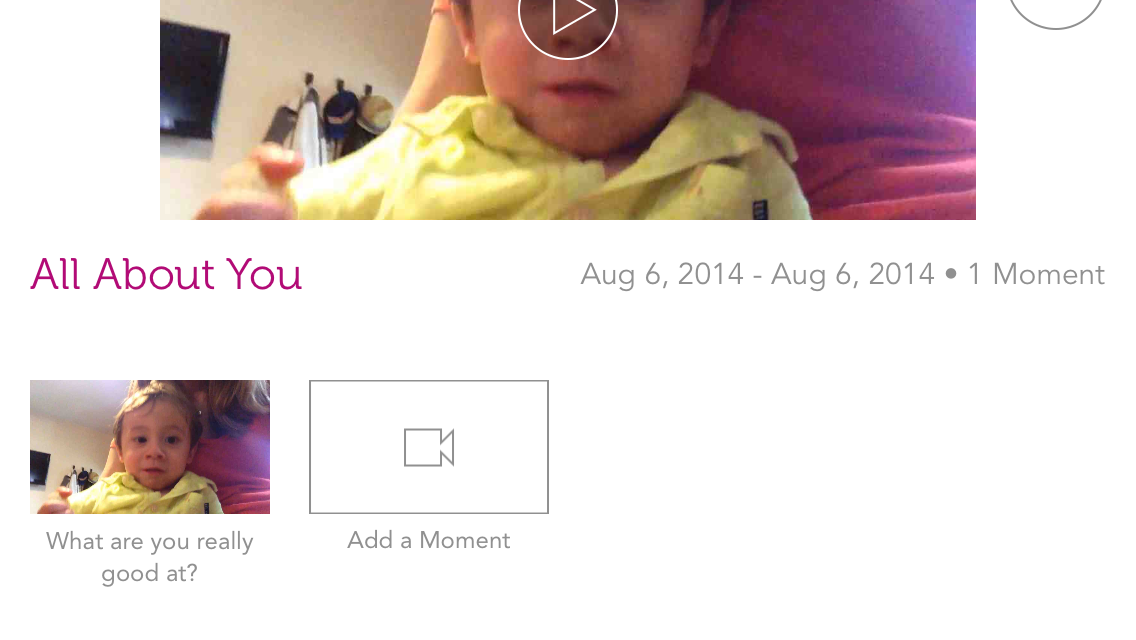
 After you capture video for your first question, which is called a “moment,” you will see this screen (above).  You can either finish the video from here to upload, or add more moments to your video!  You can string together up to 10 moments to make a longer video.

OneDay stores the videos for you so you can go back to them later to add more moments or upload them later if you need to wait.  After you upload your video, they also give you a link you can use to share it with family and friends!  You can also save it to your phone, send it in an email or text message or share via social media.

The finished videos are very cute because they add in transitions with music and show the questions for each section of your video.  You can see an example in our movie below!  It is very user friendly, so that even someone with no video editing skills can make a nice movie keepsake.  After all, all you have to do it press start and stop to record the video, the app edits them together for you!

The app is free (for now) and even since I’ve downloaded it they had already updated with more questions!

Upgraded features coming soon to the OneDay app include: creating your own questions, choice of music and choice of theme.  The improvement that I am looking forward to the most is the ability to create your own questions, which will be more suitable for kids who can’t talk yet, or just for a wider variety of situations.  I can imagine so many possibilities with that feature, such as creating a happy birthday video with messages from different people at the party, or even a congratulations video for a wedding or expecting parents!

For Carter I chose the “Favorite Things” theme and picked some questions so he could show off some of his favorite toys and friends!  Here is an example of what the completed videos look like:

I love the videos we created and I am excited to keep experimenting with it in the future!  I can see a lot of possibilities with this app for creating memories together with Carter and other family members, too!  It would be fun to make a time capsule of memory videos to go back and look at later, or to create videos with special messages for family to view on their birthdays!

Want to try it out yourself and see what it’s all about?  You can download it here!


Be sure to check out OneDay on social media: Facebook // Twitter // Instagram // Pinterest

What would you use the OneDay app for?  Do you take videos on your iPhone?
Disclaimer: This post is sponsored by OneDay and Blog Buzz 2 Go.  All opinions are my own and I honestly do think this app is very cool.

Tweet
Share
Share
Pin

You may also like

Previous Post: « Fitbit Flex Giveaway!
Next Post: Check Out Sitter Select! »

Primary Sidebar

Recently Popular Posts

  • Old Fashioned Jello Shots
    Old Fashioned Jello Shots
  • Orange Creamsicle Jello Shots
    Orange Creamsicle Jello Shots
  • Long Island Iced Tea Jello Shots
    Long Island Iced Tea Jello Shots
  • The Best Homemade Boozy Gummy Bears
    The Best Homemade Boozy Gummy Bears
  • Key Lime Pie Jello Shots
    Key Lime Pie Jello Shots

Footer

Ciao!

Insta Adventures

Cheers to Team USA! On to the next round! (Shot re Cheers to Team USA! On to the next round! (Shot recipe in my earlier reel or in my website!) #teamusa #worldcup #usaπŸ‡ΊπŸ‡Έ #jelloshots #redwhiteblue
Do you prefer garnish or no on your jello shots? # Do you prefer garnish or no on your jello shots? #jelloshots #finishingsugar #mccormick #4thofjuly #redwhiteblue
Limoncello margarita shots πŸ‹ These shots are ze Limoncello margarita shots
πŸ‹ These shots are zesty and refreshing! Perfect for summer! #jelloshots #limoncello #margarita #summervibesβ˜€οΈ 

Recipe:
πŸ‹ 1 cup boiling water
πŸ‹ A 3-ounce package lemon jello or similar gelatin dessert mix 
πŸ‹ 1/2 cup tequila 
πŸ‹ 1/2 cup limoncello
πŸ‹ shot syringes or shot cups 

Mix boiling water with lemon jello and stir until fully dissolved. Add alcohols and stir. Divide between syringes and transfer to fridge to set, about four hours. Don’t forget to put the caps on the syringes!

πŸ‹ Makes 12-15 shots depending on the size syringes/cups you use! (The ones in the video are 1.5 ounce ez-inject syringes)

Cheers!
It’s time for red, white and blue shots!! Perfec It’s time for red, white and blue shots!! Perfect for the 4th of July and watching Team USA in the World Cup! This new version is also dairy free! #jelloshots #4thofjuly #worldcup2026 #teamusa #jelloshotsfordays
β€οΈπŸ€πŸ’™β€οΈπŸ€πŸ’™
Recipe: (makes 28-30 shots)
❀️ 2 cups of water and 3 cups vodka, divided 
🀍 3-ounce boxes jello mix in blue and red (I used cherry)
πŸ’™ 1 cup white Gatorade 
❀️ 1 packet Knox gelatin 
🀍 white food coloring 3-5 drops, or as desired 
πŸ’™ ez squeeze shot cups

Make it!
πŸ’™make the blue layer- mix 1 cup boiling water with blue jello. Add 1 cup vodka. Divide between shot cups, transfer to fridge to set, at least a few hours. 
🀍make white layer- pour 1 cup Gatorade into saucepan. Sprinkle Knox over liquid and let it bloom for a minute. Turn on heat and bring to just a boil, stirring a little. Remove from heat and add 1 cup vodka. Add food coloring if desired! Divide between shot cups and return to fridge to set. 
❀️ make red layer- repeat steps from blue, but with red jello! Transfer to fridge to set before serving. 

Be sure to let each layer fully set before adding the next one! Cheers!
🌈 Rainbow shots are perfect for pride month! St 🌈 Rainbow shots are perfect for pride month! Start with purple and then work your way up through the rainbow, ending with red as the top layer. I added a drop of white food coloring to every other color to make the layers pop and change the hue a little, but this is optional! Be sure to let each layer set before going on to the next. #jelloshots #pride #rainbow #jellyshots 

Basic recipe: (makes 25-28 shots depending on how full you make them)
🌈 1/2 cup water and 1/2 cup vodka for each layer 
🌈 A 3-ounce box jello mix in each color of the rainbow

🌈 For each layer: mix 1/2 cup hot water with jello mix, stirring well until dissolved. Add 1/2 cup vodka. Divide between shot cups, just a little in each cup. Set in fridge for a few hours before starting the next layer

🌈 Link in bio for full recipe!!
What color are these shots? 😎 #jelloshots #intu What color are these shots? 😎 #jelloshots #intuitiontest
Follow on Instagram

Search

Archives

Categories

Privacy Policy

http://myminiadventurer.com/privacy-policycookies

Copyright My Mini Adventurer © 2026 Β· Sprinkle Pro Theme

5 shares
We use cookies to ensure that we give you the best experience on our website. If you continue to use this site we will assume that you are happy with it.Accept!Privacy Policy